
Ransomware is one of the most dangerous cyber threats for businesses. It can lock company files, encrypt servers, stop operations, steal sensitive data, damage customer trust, and create serious financial loss. For a small business, one ransomware attack can be enough to shut down daily work for days or even weeks.
That is why businesses need more than basic antivirus.
The best ransomware protection software for businesses combines prevention, detection, response, and recovery. It helps block malware, stop suspicious encryption activity, detect attacker behavior, protect endpoints, secure email, monitor remote devices, and restore clean data from backups if an attack succeeds.
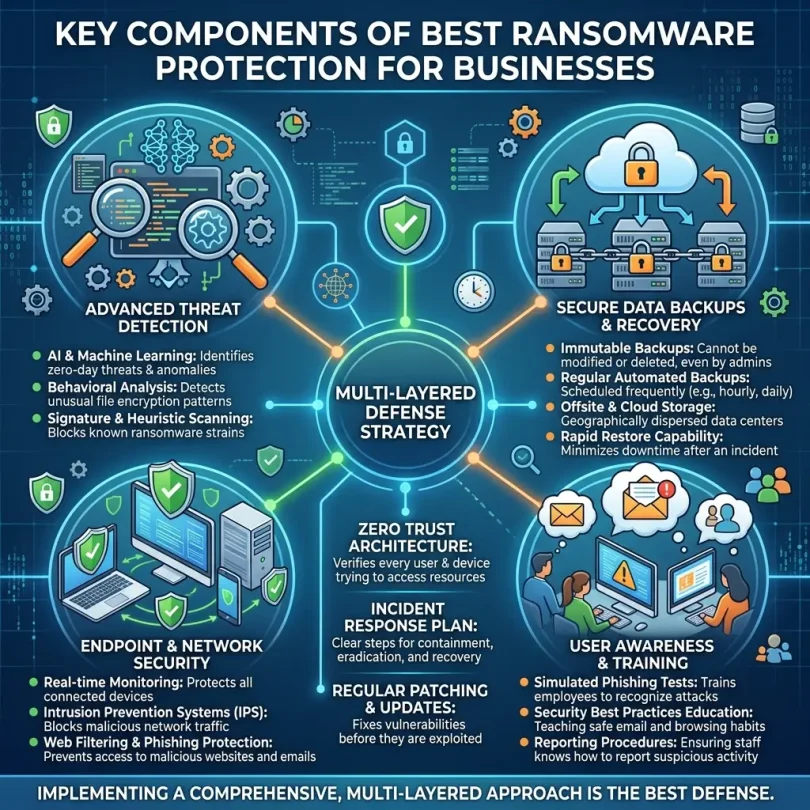
In 2026, ransomware protection is not one simple tool. A strong ransomware defense usually includes endpoint security, EDR, email security, cloud backup, identity protection, multi-factor authentication, patch management, and employee training.
In this guide, we will compare the best ransomware protection software for businesses, explain which features matter most, and help you choose the right solution for your company.
What Is Ransomware Protection Software?
Ransomware protection software is a cybersecurity tool or platform that helps prevent, detect, stop, and recover from ransomware attacks.
Ransomware is malicious software that blocks access to files, devices, systems, or networks until a ransom is demanded. In many modern attacks, criminals may also steal business data before encryption and threaten to leak it publicly.
Ransomware protection software may include:
- Endpoint protection
- Anti-malware
- Behavioral ransomware detection
- Endpoint detection and response
- Extended detection and response
- Managed detection and response
- Email security
- Web protection
- Backup and recovery
- Immutable backup
- Device isolation
- Automated remediation
- Threat hunting
- Patch management
- Vulnerability management
- Application control
- Identity protection
- Incident response support
The goal is not only to stop known ransomware files. Modern ransomware protection must detect suspicious behavior, such as mass file encryption, privilege escalation, credential theft, lateral movement, suspicious PowerShell activity, and attempts to delete backups.
CISA recommends maintaining offline, encrypted backups of critical data and regularly testing backup availability and integrity because many ransomware variants try to find, delete, or encrypt accessible backups.
Why Businesses Need Ransomware Protection
Ransomware is not only an enterprise problem. Small businesses, agencies, healthcare offices, law firms, accounting firms, eCommerce stores, schools, manufacturers, consultants, and local service businesses can all be targeted.
Businesses need ransomware protection because attacks can cause:
- Locked files
- Business downtime
- Lost revenue
- Stolen customer data
- Legal and compliance problems
- Reputation damage
- Recovery costs
- Emergency IT expenses
- Lost employee productivity
- Broken client trust
A ransomware attack usually does not start with a dramatic event. It often begins with a phishing email, stolen password, exposed remote access service, unpatched software, or compromised endpoint.
That is why businesses need layered ransomware protection.
Best Ransomware Protection Software for Businesses
Below are some of the strongest ransomware protection software options for small and mid-sized businesses, remote teams, professional service companies, and growing organizations.
1. Sophos Intercept X
Best for: Advanced ransomware defense and endpoint protection
Good for: Small businesses, remote teams, professional services, MSP-managed companies
Main strength: Deep learning, anti-ransomware protection, EDR, XDR, and MDR options
Sophos Intercept X is one of the strongest ransomware protection solutions for businesses that want advanced endpoint security. Sophos says Intercept X proactively secures endpoints from ransomware attacks and malicious exploits with deep learning, XDR, and simplified management.
Sophos is also strong because it offers managed detection and response options. This matters for businesses that do not have a full internal security team.
Key Features
- Endpoint protection
- Anti-ransomware technology
- Deep learning malware detection
- Exploit prevention
- Endpoint detection and response
- Extended detection and response
- Managed detection and response options
- CryptoGuard ransomware protection
- Web protection
- Device control
- Central cloud management
- Attack investigation tools
Why Sophos Is Good for Ransomware Protection
Sophos is useful because ransomware attacks can arrive through phishing emails, insecure websites, malicious attachments, targeted attacks, and compromised devices. Sophos specifically positions Intercept X for ransomware and exploit defense, making it a strong fit for businesses that need more than basic antivirus.
Best Fit
Sophos Intercept X is best for businesses that want strong ransomware prevention, endpoint security, and optional managed detection support.
Possible Downsides
Sophos can be more advanced than basic antivirus. Some businesses may need an IT provider or managed service partner to configure it properly.
2. Microsoft Defender for Business
Best for: Businesses using Microsoft 365
Good for: SMB endpoint protection, ransomware defense, EDR, automated remediation
Main strength: Native Microsoft ecosystem security
Microsoft Defender for Business is a strong ransomware protection option for companies already using Microsoft 365. It is designed for small and medium-sized businesses with up to 300 users and includes endpoint detection and response, automatic attack disruption, automated investigation and remediation, and cross-platform support for Windows, macOS, Android, and iOS.
Key Features
- Endpoint protection
- Endpoint detection and response
- Automated investigation and remediation
- Automatic attack disruption
- Ransomware protection
- Malware protection
- Threat and vulnerability management
- Cross-platform device protection
- Microsoft 365 integration
- Cloud-based security dashboard
- Security recommendations
Why Microsoft Defender for Business Is Good
Many businesses already use Microsoft 365 for email, Teams, OneDrive, SharePoint, and office productivity. Microsoft Defender for Business fits naturally into that environment.
It helps protect remote devices, detect suspicious behavior, respond to attacks, and reduce ransomware risk across business endpoints.
Best Fit
Microsoft Defender for Business is best for SMBs that use Microsoft 365 and want endpoint security integrated with Microsoft’s business ecosystem.
Possible Downsides
Businesses outside the Microsoft ecosystem may not get the same value. Setup quality also matters; poor configuration can reduce protection.
3. Acronis Cyber Protect Cloud
Best for: Ransomware protection plus backup and recovery
Good for: Businesses that need prevention and fast restore
Main strength: Cybersecurity, backup, disaster recovery, and endpoint management together
Acronis Cyber Protect Cloud is different from many ransomware protection tools because it combines cybersecurity with backup and disaster recovery. Acronis says Cyber Protect Cloud integrates backup, disaster recovery, AI-based malware protection, remote assistance, and management.
This is important because ransomware defense is not only about blocking attacks. Businesses also need recovery if an attack gets through.
Key Features
- Endpoint protection
- Anti-malware
- Ransomware protection
- Real-time threat detection
- AI-based behavioral analysis
- Secure backup and recovery
- Disaster recovery
- Patch management
- Vulnerability assessments
- Remote management
- Microsoft 365 backup options
- Cloud-based console
Why Acronis Is Good for Ransomware Protection
Acronis is strong because it focuses on both protection and recovery. Acronis states its Cyber Protect solution includes real-time threat detection, AI-based behavioral analysis, proactive vulnerability assessments, and secure backup and recovery capabilities.
For businesses worried about ransomware, backup is critical. If files are encrypted, the company needs clean restore points.
Best Fit
Acronis Cyber Protect Cloud is best for businesses that want endpoint security, backup, and disaster recovery in one platform.
Possible Downsides
Acronis may feel broader than a simple endpoint security tool. Pricing can also depend on selected modules, storage, and provider.
4. Bitdefender GravityZone Business Security
Best for: Small business ransomware and malware protection
Good for: Endpoint protection, phishing defense, small IT teams
Main strength: Strong malware detection and SMB-friendly security
Bitdefender GravityZone is a strong business cybersecurity platform for small and mid-sized companies. It is designed to protect businesses from ransomware, phishing, fileless attacks, malware, and other threats.
Key Features
- Endpoint protection
- Anti-malware
- Ransomware protection
- Phishing protection
- Fileless attack protection
- Web protection
- Device control
- Risk analytics
- Central cloud management
- Endpoint policies
- Security reporting
Why Bitdefender Is Good for Ransomware Protection
Bitdefender is useful for small businesses because it combines strong prevention with centralized management. It can protect remote and office devices from ransomware-related threats without requiring a large security team.
Bitdefender’s small business product is marketed for organizations that need easy-to-use protection against ransomware, phishing, and fileless attacks without cybersecurity staff.
Best Fit
Bitdefender GravityZone is best for small businesses that want strong ransomware and malware protection with manageable administration.
Possible Downsides
Some advanced EDR and MDR capabilities may require higher-tier plans.
5. CrowdStrike Falcon
Best for: Advanced endpoint detection and response
Good for: Modern businesses, remote teams, security-conscious companies
Main strength: Cloud-native endpoint protection and threat detection
CrowdStrike Falcon is a leading endpoint security platform used by many organizations for malware prevention, ransomware defense, EDR, threat intelligence, and managed detection options.
For smaller businesses, CrowdStrike Falcon Go provides a simpler entry-level endpoint protection option with AI-powered next-generation antivirus and device control.
Key Features
- Next-generation antivirus
- Endpoint protection
- Endpoint detection and response
- Threat intelligence
- Device control
- Cloud-native management
- Managed detection options
- Ransomware behavior detection
- Lightweight endpoint agent
- Attack investigation
- Identity protection options
Why CrowdStrike Is Good for Ransomware Protection
CrowdStrike is useful for businesses that want strong endpoint visibility and rapid response. Ransomware attacks often involve multiple steps before encryption, including reconnaissance, credential theft, privilege escalation, and lateral movement. EDR helps detect suspicious behavior before major damage.
Best Fit
CrowdStrike is best for businesses that want premium endpoint protection, EDR, and advanced threat detection.
Possible Downsides
Advanced CrowdStrike plans may cost more than basic SMB endpoint security products.
6. SentinelOne Singularity Endpoint
Best for: Automated ransomware detection and response
Good for: Businesses that need fast containment and rollback capabilities
Main strength: AI-based endpoint protection and automated remediation
SentinelOne Singularity Endpoint is a strong ransomware protection platform known for autonomous detection and response. It uses behavioral AI to detect suspicious activity and can help contain threats quickly.
Key Features
- Endpoint protection
- Endpoint detection and response
- Behavioral AI detection
- Automated response
- Ransomware protection
- Threat hunting
- Device isolation
- Attack storylines
- Rollback features
- Cloud-based management
- Cross-platform support
Why SentinelOne Is Good for Ransomware Protection
SentinelOne is useful because ransomware attacks move fast. Automated response helps isolate affected devices and stop malicious processes before they spread.
Rollback features may help recover certain changes after an attack, depending on environment and configuration.
Best Fit
SentinelOne is best for businesses that want advanced EDR, automation, and fast response against ransomware.
Possible Downsides
It may be more advanced and expensive than what very small businesses need.
7. Malwarebytes ThreatDown
Best for: Small businesses with limited IT staff
Good for: Endpoint protection, malware removal, MDR options
Main strength: Simple business security with managed support options
ThreatDown by Malwarebytes is designed for businesses that need endpoint protection and managed detection options without heavy complexity. It can help protect endpoints from malware, ransomware, and other threats while offering managed support for teams with limited security staff.
Key Features
- Endpoint protection
- Anti-malware
- Ransomware protection
- Managed detection and response options
- Email security options
- Threat detection
- Centralized console
- Lightweight deployment
- Security reporting
- Analyst-supported options
Why ThreatDown Is Good for Ransomware Protection
ThreatDown is useful for small businesses that do not have internal security experts. Ransomware alerts are only helpful if someone can investigate and respond. Managed detection options can reduce the burden on small teams.
Best Fit
ThreatDown is best for small businesses that want simple endpoint protection with optional managed detection support.
Possible Downsides
High-risk companies may need deeper enterprise controls from Sophos, CrowdStrike, SentinelOne, Microsoft Defender, or Trend Micro.
8. Trend Vision One
Best for: XDR-based ransomware detection
Good for: Businesses needing endpoint, email, cloud, and identity visibility
Main strength: Extended detection and response across multiple attack surfaces
Trend Vision One is a broader cybersecurity platform that connects endpoint security with email, cloud, identity, and network signals. This XDR approach can help detect ransomware activity across multiple parts of a business environment.
Key Features
- Endpoint protection
- XDR
- Ransomware protection
- Email security integration
- Cloud security integration
- Identity threat detection
- Attack surface visibility
- Risk insights
- Threat intelligence
- Centralized detection and response
- Investigation workflows
Why Trend Vision One Is Good for Ransomware Protection
Ransomware attacks rarely happen on only one device. They may start in email, move through identity systems, spread across endpoints, and reach cloud data. XDR helps connect these signals.
Best Fit
Trend Vision One is best for businesses that want broader threat visibility beyond endpoint antivirus.
Possible Downsides
It may be too advanced for very small businesses that only need simple ransomware protection.
9. WatchGuard Endpoint Security
Best for: Endpoint protection plus network security ecosystem
Good for: Businesses using WatchGuard firewalls or managed IT providers
Main strength: Endpoint and network security alignment
WatchGuard Endpoint Security provides endpoint protection against malware, ransomware, zero-day threats, and suspicious behavior. It is especially useful for businesses already using WatchGuard network security products.
Key Features
- Endpoint protection
- Ransomware defense
- Malware protection
- Zero-day threat protection
- Patch management options
- Device control
- Cloud management
- Threat detection
- Application control options
- Managed service provider support
Why WatchGuard Is Good for Ransomware Protection
WatchGuard can be a good option for businesses that want endpoint and network security managed together. Many small businesses use WatchGuard through IT providers, which can make monitoring and response easier.
Best Fit
WatchGuard Endpoint Security is best for businesses using WatchGuard firewalls or working with managed service providers.
Possible Downsides
Setup may require technical support, especially for businesses without IT staff.
10. ESET PROTECT Advanced
Best for: Lightweight ransomware protection
Good for: Performance-sensitive businesses, remote teams, small offices
Main strength: Reliable endpoint protection with low system impact
ESET PROTECT Advanced is a strong option for businesses that want lightweight endpoint protection with centralized management. It is often chosen by teams that need security software that does not slow down devices.
Key Features
- Endpoint protection
- Anti-malware
- Ransomware protection
- Cloud management
- Web protection
- Device control
- Full disk encryption options
- Mail security options
- File server security
- Remote deployment
- Low system impact
Why ESET Is Good for Ransomware Protection
ESET is useful for small businesses with mixed devices, remote workers, or older machines. Performance matters because employees may disable or avoid security tools that slow down work.
Best Fit
ESET PROTECT Advanced is best for businesses that want reliable, lightweight ransomware protection with centralized management.
Possible Downsides
Businesses needing advanced XDR or managed response may prefer Sophos, CrowdStrike, SentinelOne, Trend Vision One, or Microsoft Defender.
Quick Comparison Table
| Ransomware Protection Software | Best For | Main Strength | Best Business Type |
|---|---|---|---|
| Sophos Intercept X | Advanced ransomware defense | Deep learning, XDR, MDR options | SMBs and remote teams |
| Microsoft Defender for Business | Microsoft 365 users | EDR, remediation, Microsoft integration | SMBs using Microsoft 365 |
| Acronis Cyber Protect Cloud | Protection plus recovery | Backup, disaster recovery, endpoint security | Businesses needing restore options |
| Bitdefender GravityZone | Small business protection | Malware, phishing, ransomware defense | Small businesses |
| CrowdStrike Falcon | Advanced endpoint detection | Cloud-native EDR and threat intelligence | Security-conscious businesses |
| SentinelOne Singularity | Automated response | Behavioral AI and rollback features | Businesses needing fast containment |
| ThreatDown by Malwarebytes | Limited IT teams | Simple protection and MDR options | Small businesses |
| Trend Vision One | XDR visibility | Endpoint, email, cloud, identity signals | Growing businesses |
| WatchGuard Endpoint Security | Managed IT environments | Endpoint and network security | MSP-supported businesses |
| ESET PROTECT Advanced | Lightweight protection | Low system impact and remote deployment | Performance-sensitive teams |
Important Features to Look for in Ransomware Protection Software
Ransomware protection software should not only block known malware. Modern ransomware attacks use stealth, stolen credentials, living-off-the-land tools, phishing, remote access abuse, and backup destruction.
Here are the most important features.
1. Behavioral Ransomware Detection
The software should detect suspicious behavior such as mass file encryption, rapid file renaming, unauthorized process activity, and attempts to modify backup files.
2. Endpoint Detection and Response
EDR helps investigate what happened on an endpoint and respond quickly. This is critical because ransomware attacks can spread fast.
3. Automated Device Isolation
If one device is infected, the software should be able to isolate it from the network to stop the attack from spreading.
4. Backup and Recovery
Backup is essential. CISA recommends offline, encrypted backups and regular testing because ransomware actors often try to delete or encrypt accessible backups.
5. Email Security
Many ransomware attacks start with phishing emails or malicious attachments. Email filtering, link protection, and attachment sandboxing reduce risk.
6. Exploit Prevention
Ransomware may use vulnerabilities in software, browsers, remote access tools, or operating systems. Exploit prevention helps block these attack techniques.
7. Patch Management
Unpatched software creates openings for attackers. Ransomware protection should include or integrate with vulnerability and patch management.
8. Multi-Factor Authentication
Stolen passwords are a major risk. MFA reduces the chance that attackers can use stolen credentials to access systems.
9. Threat Intelligence
Threat intelligence helps identify known ransomware groups, infrastructure, malicious domains, and attack patterns.
10. Managed Detection and Response
MDR is useful for businesses without an internal security team. It gives access to experts who can monitor, investigate, and respond to threats.
Ransomware Protection vs Antivirus
Traditional antivirus is no longer enough for business ransomware protection.
Antivirus
Antivirus mainly detects known malware files and blocks them.
Ransomware Protection
Ransomware protection should include:
- Antivirus
- Endpoint detection and response
- Behavioral detection
- Email security
- Web protection
- Backup and recovery
- Device isolation
- Identity protection
- Patch management
- Incident response
- Managed detection options
Antivirus is one layer. Ransomware protection is a full strategy.
Best Ransomware Protection by Business Type
Best for Small Businesses
Bitdefender GravityZone, Microsoft Defender for Business, ESET PROTECT Advanced, and ThreatDown are strong options for small businesses.
Best for Microsoft 365 Businesses
Microsoft Defender for Business is the best starting point because it integrates naturally with Microsoft 365 and supports SMBs up to 300 users.
Best for Backup and Recovery
Acronis Cyber Protect Cloud is one of the best options because it combines endpoint protection with backup, disaster recovery, and cyber protection.
Best for Advanced Ransomware Defense
Sophos Intercept X, CrowdStrike Falcon, and SentinelOne Singularity Endpoint are strong options for businesses that need deeper detection and response.
Best for Businesses Without Security Staff
Sophos MDR, ThreatDown MDR, Acronis through an MSP, and managed service provider-based WatchGuard setups can help businesses that lack internal security teams.
Best for Growing Companies
Trend Vision One, CrowdStrike, SentinelOne, and Microsoft Defender are strong options for growing businesses that need better visibility and response.
Recommended Ransomware Protection Stack
Ransomware protection works best as a layered setup.
A strong business ransomware defense stack includes:
- Endpoint security on every device
- Email security to block phishing
- Cloud backup with offline or immutable copies
- Multi-factor authentication for all important accounts
- Password manager for strong unique passwords
- Business VPN or zero trust access for remote access
- Patch management for software updates
- Admin access controls to limit privilege
- Employee training to reduce phishing clicks
- Incident response plan for fast action
No single tool can guarantee full protection. The goal is to reduce risk, detect attacks early, stop spread, and recover quickly.
How Much Does Ransomware Protection Software Cost?
Pricing depends on:
- Number of users
- Number of devices
- Endpoint protection level
- EDR or XDR features
- MDR services
- Backup storage
- Disaster recovery needs
- Email security add-ons
- Server protection
- Cloud workload protection
- Support level
- Monthly or annual billing
Basic endpoint protection costs less. EDR, XDR, MDR, backup, and disaster recovery cost more but provide stronger protection.
When comparing prices, ask:
- Does it include ransomware behavior detection?
- Can it isolate infected devices?
- Does it include EDR?
- Does it include backup and recovery?
- Are backups immutable or offline?
- Does it include email protection?
- Is MDR included or extra?
- Does it support remote teams?
- Does it protect servers?
- Does it provide clear reports?
The cheapest ransomware protection may not be enough if your business depends heavily on data.
Ransomware Prevention Best Practices for Businesses
Keep Offline or Immutable Backups
Your backup should not be easily reachable by attackers. CISA warns that ransomware variants often try to delete or encrypt accessible backups.
Test Backup Restores
A backup is only useful if it works. Test restores regularly.
Enable MFA Everywhere
Use MFA on email, VPN, cloud storage, admin panels, accounting systems, and security consoles.
Patch Software Quickly
Update operating systems, browsers, VPNs, remote desktop tools, servers, plugins, and business software.
Protect Email
Use email security software to block phishing, malicious attachments, and dangerous links.
Limit Admin Rights
Employees should not use admin accounts for daily work. Admin access should be limited and monitored.
Disable Unused Remote Access
Remote Desktop Protocol, old VPN accounts, unused admin portals, and forgotten remote tools can create risk.
Train Employees
Teach employees to avoid suspicious attachments, urgent payment emails, fake login pages, and unknown downloads.
Monitor Security Alerts
Alerts should be reviewed quickly. If no one checks alerts, protection is weaker.
Prepare an Incident Response Plan
Know who will isolate devices, reset passwords, contact IT support, restore backups, and communicate with customers if an attack happens.
Common Ransomware Protection Mistakes
Mistake 1: Relying Only on Antivirus
Modern ransomware can bypass basic antivirus. Businesses need endpoint security, EDR, backup, email protection, and MFA.
Mistake 2: Keeping Backups Online All the Time
If backups are always connected, ransomware may encrypt or delete them.
Mistake 3: Never Testing Backups
Many businesses discover backup failures only after an attack.
Mistake 4: Not Protecting Remote Devices
Remote laptops are often the first entry point.
Mistake 5: Ignoring Email Security
Phishing remains one of the most common ways attackers enter businesses.
Mistake 6: Weak Passwords and No MFA
Stolen passwords can give attackers access to email, VPN, admin dashboards, and cloud systems.
Mistake 7: Giving Everyone Admin Rights
Too much privilege increases ransomware damage.
Mistake 8: No Incident Response Plan
During an attack, confusion wastes time. A written plan helps the business respond faster.
What to Do If Ransomware Hits Your Business
If your business suspects a ransomware attack, act quickly.
1. Isolate Affected Devices
Disconnect infected computers from the network. Do not turn everything off without guidance if evidence may be needed.
2. Stop the Spread
Disable compromised accounts, disconnect shared drives, and block suspicious access.
3. Preserve Evidence
Keep logs, ransom notes, suspicious emails, file samples, and system details for investigation.
4. Contact IT or Security Experts
If you have MDR, MSP, or incident response support, contact them immediately.
5. Report the Incident
Depending on your country and business type, you may need to report the attack to relevant authorities or regulators.
6. Validate Backups
Before restoring, confirm backups are clean and not compromised.
7. Rebuild Safely
Do not restore infected systems without understanding the attack path.
8. Reset Passwords
Reset passwords for compromised accounts, admin accounts, email, VPN, and cloud tools.
9. Review Security Gaps
Find out how attackers got in and fix the weakness before fully returning to normal.
10. Improve Defenses
After recovery, strengthen endpoint security, email security, MFA, backups, patching, and employee training.
Final Verdict: What Is the Best Ransomware Protection Software?
The best ransomware protection software depends on your business environment, budget, and risk level.
For most businesses:
- Best overall ransomware protection: Sophos Intercept X
- Best for Microsoft 365 SMBs: Microsoft Defender for Business
- Best ransomware protection plus recovery: Acronis Cyber Protect Cloud
- Best for small business endpoint protection: Bitdefender GravityZone
- Best premium EDR: CrowdStrike Falcon
- Best automated response: SentinelOne Singularity Endpoint
- Best for limited IT teams: ThreatDown by Malwarebytes
- Best XDR visibility: Trend Vision One
- Best lightweight protection: ESET PROTECT Advanced
If your business uses Microsoft 365, start with Microsoft Defender for Business. If ransomware recovery is your biggest concern, compare Acronis. If you want advanced ransomware prevention and response, compare Sophos, CrowdStrike, SentinelOne, and Trend Vision One.
The most important point is simple: ransomware protection is not one product. It is a layered defense. Use strong endpoint protection, secure email, MFA, backups, patching, and employee training together.
FAQs About Ransomware Protection Software
What is the best ransomware protection software for businesses?
Sophos Intercept X, Microsoft Defender for Business, Acronis Cyber Protect Cloud, Bitdefender GravityZone, CrowdStrike Falcon, SentinelOne, ThreatDown, Trend Vision One, WatchGuard, and ESET are strong ransomware protection options.
Can antivirus stop ransomware?
Basic antivirus can block some ransomware, but it is not enough by itself. Businesses need endpoint security, EDR, email protection, backup, MFA, and patch management.
Do small businesses need ransomware protection?
Yes. Small businesses are often targeted because they may have weaker defenses and limited IT staff. Ransomware protection helps reduce downtime, data loss, and recovery costs.
Is backup enough to protect against ransomware?
No. Backup is essential, but it is not enough alone. CISA recommends offline, encrypted backups and regular testing because ransomware often tries to delete or encrypt accessible backups.
What is the best ransomware protection for Microsoft 365 users?
Microsoft Defender for Business is a strong option for SMBs using Microsoft 365 because it includes endpoint detection and response, automatic attack disruption, and automated investigation and remediation.
What is EDR in ransomware protection?
EDR means Endpoint Detection and Response. It helps detect suspicious endpoint activity, investigate attacks, isolate devices, and respond to threats.
What is MDR?
MDR means Managed Detection and Response. It gives businesses access to security experts who monitor, investigate, and respond to threats.
Can ransomware infect cloud storage?
Yes. If cloud storage syncs encrypted or infected files, ransomware damage can spread to cloud folders. Businesses need version history, backup, access controls, and ransomware protection.
Should businesses pay ransomware criminals?
Security agencies generally discourage paying because it does not guarantee recovery and may encourage more attacks. Businesses should focus on recovery, reporting, investigation, and prevention.
What is the most important ransomware protection step?
The most important step is layered defense: endpoint protection, email security, MFA, patching, offline or immutable backups, and regular restore testing.