
Passwords are still one of the weakest points in business security. A company can have good antivirus, cloud backup, firewalls, and email protection, but one weak password can still open the door to attackers.
Small businesses, agencies, remote teams, eCommerce stores, law firms, clinics, accounting firms, software companies, and online service businesses all use dozens of accounts every day. Employees log in to email, cloud storage, payment dashboards, hosting accounts, CRMs, social media profiles, project management tools, ad accounts, analytics tools, and client portals.
The problem is simple: people reuse passwords, save them in browsers, write them in spreadsheets, send them through chat, or share them in plain text. This creates serious security risks.
A business password manager solves this problem by storing passwords securely, generating strong passwords, allowing safe password sharing, controlling employee access, and helping teams avoid password reuse.
The best password managers for business and team security in 2026 offer more than a simple password vault. They include admin controls, encrypted sharing, multi-factor authentication, single sign-on integrations, user provisioning, audit logs, passkey support, breach monitoring, and access management.
In this guide, we will compare the best business password managers, explain which features matter most, and help you choose the right password management software for your company.
What Is a Business Password Manager?
A business password manager is a secure software tool that helps companies store, manage, share, and protect passwords, passkeys, login credentials, secure notes, API keys, payment details, and other sensitive information.
Unlike a personal password manager, a business password manager gives administrators control over team access. Business owners or IT managers can decide who can access which passwords, remove users when employees leave, enforce password policies, require multi-factor authentication, and monitor risky password behavior.
A business password manager usually includes:
- Encrypted password vaults
- Password generator
- Secure team sharing
- Admin dashboard
- Role-based access control
- Multi-factor authentication
- Password health reports
- Breach monitoring
- User provisioning
- Single sign-on support
- Audit logs
- Browser extensions
- Mobile apps
- Passkey support
- Secure notes and file storage
For teams, the main benefit is simple: employees can use strong, unique passwords without needing to remember them all.
Why Businesses Need a Password Manager in 2026
In 2026, businesses use more online tools than ever before. Most companies now depend on cloud apps, remote access, digital payments, SaaS platforms, email accounts, and admin dashboards.
That creates more password risk.
A business password manager helps reduce the most common password security problems.
1. Password Reuse
Employees often reuse the same password across multiple accounts. If one account is compromised, attackers may try the same password on email, cloud storage, payment dashboards, or admin panels.
A password manager helps every employee use a unique password for every account.
2. Weak Passwords
Simple passwords are easier to guess or crack. NIST explains that passwords remain insecure because even long or complex passwords can be guessed, stolen, or compromised. That is why businesses need stronger authentication practices, not just “harder” passwords.
3. Unsafe Password Sharing
Many teams still share passwords through email, WhatsApp, Slack, spreadsheets, Google Docs, or plain text notes. This is risky because passwords can be copied, forwarded, leaked, or forgotten after employees leave.
A password manager allows secure password sharing without exposing the actual password in many cases.
4. Former Employee Access
When an employee leaves, the company must remove their access quickly. If passwords were shared manually, it becomes hard to know what they still have.
A business password manager makes it easier to remove users, revoke access, and rotate shared passwords.
5. Remote Team Security
Remote workers often access company tools from different networks, devices, and locations. A password manager gives centralized control over team credentials even when employees are distributed.
6. Compliance and Audit Needs
Some businesses need to show that they manage access properly. Password managers with audit logs, reporting, access controls, and user activity tracking can help support better security governance.
7. MFA and Stronger Login Protection
CISA recommends multifactor authentication because adding another step beyond a password can protect businesses, online purchases, and bank accounts. A good business password manager should support MFA for the password vault itself and encourage MFA across important accounts.
Best Password Managers for Business and Team Security
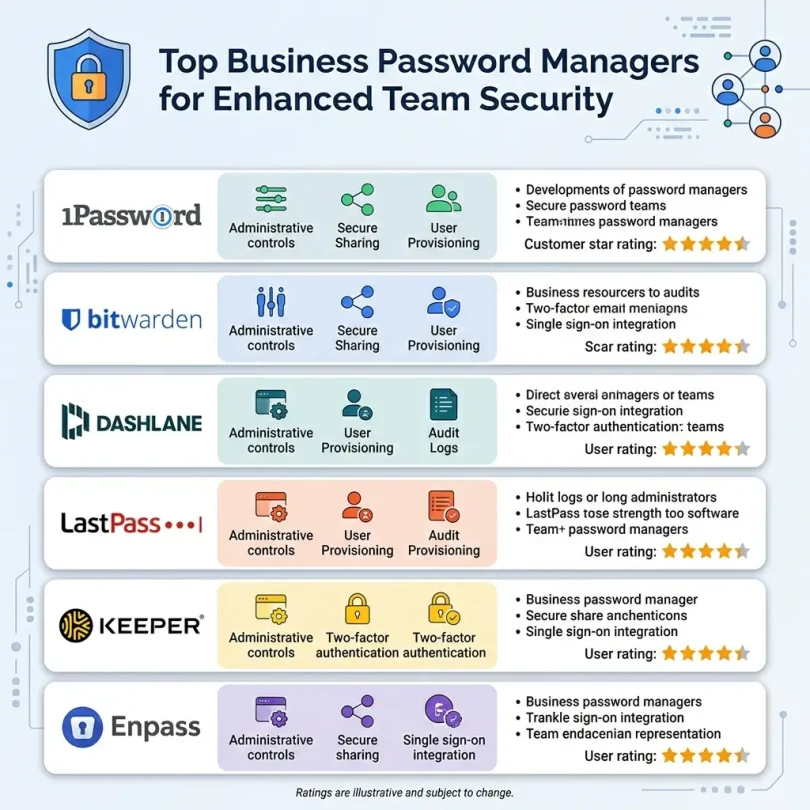
Below are some of the strongest password managers for businesses, teams, and organizations.
1. 1Password Business
Best for: Teams that want strong business security and polished usability
Good for: Agencies, startups, remote teams, professional services, SaaS-heavy companies
Main strength: Business password management with advanced access controls
1Password Business is one of the most popular business password managers. It is widely used by startups, agencies, remote teams, software companies, and professional businesses that want secure credential sharing with a clean user experience.
1Password offers business password management, secure vaults, admin controls, user permissions, reporting, and integrations. It is also expanding into broader access management. In 2026, 1Password launched Unified Access in public preview for U.S.-hosted Enterprise Password Manager Business customers, aiming to centralize company credential management across SSO and non-SSO apps.
Key Features
- Encrypted business vaults
- Secure password sharing
- Admin console
- Role-based access control
- User groups
- Activity logs
- Password health reports
- Travel Mode
- Secret Key security model
- MFA support
- SSO integration options
- SCIM provisioning options
- Browser extensions
- Mobile apps
- Passkey support
Why 1Password Is Good for Business
1Password is strong because it balances security and usability. A password manager only works if employees actually use it. If the tool is too complicated, people return to spreadsheets and browser-saved passwords.
1Password makes it easy for teams to create vaults for departments, projects, clients, finance accounts, marketing tools, hosting accounts, and admin access.
For example, a digital agency can create separate vaults for:
- Social media accounts
- Client websites
- Hosting and domain accounts
- Advertising platforms
- Finance tools
- Internal admin accounts
- Developer tools
This helps keep access organized.
Best Fit
1Password Business is best for growing teams that want a premium password manager with strong usability, secure sharing, and business-grade controls.
Possible Downsides
1Password can cost more than some budget-focused password managers. Businesses that want the cheapest option may prefer Bitwarden or Zoho Vault.
2. Bitwarden Business
Best for: Budget-friendly business password management
Good for: Startups, developers, open-source-friendly teams, small businesses
Main strength: Strong value and open-source transparency
Bitwarden is a strong business password manager for companies that want secure password management at a reasonable cost. It is popular among developers, IT teams, privacy-focused users, and budget-conscious businesses.
Bitwarden describes itself as a password manager for securely managing and sharing sensitive information across browsers and devices.
Key Features
- Encrypted password vaults
- Secure credential sharing
- Team collections
- Admin dashboard
- User groups
- Directory integration options
- SSO options on advanced plans
- Event logs
- Password health reports
- Self-hosting option
- Browser extensions
- Mobile apps
- Desktop apps
- Passkey support
- Open-source codebase
Why Bitwarden Is Good for Business
Bitwarden is often attractive because it offers strong features at a lower price than many competitors. It also has open-source roots, which can increase trust for technical teams that value transparency.
It works well for:
- Small businesses
- Remote teams
- Developers
- IT consultants
- Agencies
- Nonprofits
- Startups
Bitwarden’s collections feature allows teams to organize shared credentials by department, project, or client.
Best Fit
Bitwarden Business is best for companies that want secure password management without high software costs.
Possible Downsides
Bitwarden is powerful, but some non-technical teams may find its interface less polished than 1Password or Dashlane. Setup should be done carefully to avoid messy vault organization.
3. Dashlane Business
Best for: Teams that want password security plus employee-friendly design
Good for: Small businesses, sales teams, marketing teams, distributed teams
Main strength: Strong user experience and business security features
Dashlane is a well-known password manager for individuals and businesses. It provides password storage, secure sharing, admin controls, password health monitoring, dark web monitoring, and SSO features on business plans.
TechRadar’s Dashlane review notes support for two-factor authentication, AES-256 encryption, secure autofill, password strength monitoring, passkeys, credential sharing, admin controls, and identity provider integrations on business plans.
Key Features
- Password vault
- Secure password sharing
- Admin console
- Password health score
- Dark web monitoring
- MFA support
- SSO integration
- SCIM provisioning
- Smart Spaces
- Browser extensions
- Mobile apps
- Passkey support
- Reporting and analytics
Why Dashlane Is Good for Business
Dashlane is good for teams that need strong security but also want a clean and easy user experience. Its password health reporting helps businesses find weak, reused, or compromised passwords.
Dashlane can be especially useful for teams that are not highly technical because the product is designed to make password security simple.
Best Fit
Dashlane Business is best for companies that want a polished, easy-to-use business password manager with good reporting and security controls.
Possible Downsides
Dashlane can be more expensive than some alternatives. Businesses focused mainly on low cost may prefer Bitwarden or Zoho Vault.
4. Keeper Business
Best for: Scalable password management and strong admin controls
Good for: Small businesses, mid-sized companies, compliance-focused teams
Main strength: Security, role-based access, and scalable business plans
Keeper is a business-focused password manager with strong security features, encrypted vaults, role-based access, secure sharing, admin controls, reporting, and add-ons for advanced security.
Recent reporting notes Keeper’s Business Starter plan includes centralized management, secure sharing, and role-based access for small teams.
Key Features
- Encrypted password vaults
- Secure team sharing
- Role-based access control
- Admin console
- Security audit
- BreachWatch dark web monitoring add-on
- Secrets management options
- Compliance reporting
- MFA support
- SSO integration options
- SCIM provisioning options
- Browser extensions
- Mobile apps
Why Keeper Is Good for Business
Keeper is strong for businesses that want structured access control. Its admin features are useful when companies need to manage users, roles, departments, and shared credentials carefully.
Keeper can work well for businesses in:
- Healthcare
- Legal services
- Accounting
- IT services
- Finance operations
- Managed service providers
- Professional services
Best Fit
Keeper Business is best for companies that need scalable password management with strong admin controls.
Possible Downsides
Some advanced features may require add-ons, so businesses should check total cost before choosing a plan.
5. NordPass Business
Best for: Simple business password management
Good for: Small teams, remote workers, non-technical users
Main strength: Clean design and easy deployment
NordPass Business is a simple and modern password manager for teams. It focuses on encrypted vaults, password sharing, company-wide security controls, data breach scanning, and easy usability.
NordPass is often a strong choice for teams that want a clean interface and do not want heavy setup.
Key Features
- Business password vaults
- Secure sharing
- Admin panel
- Password health
- Data breach scanner
- MFA support
- SSO options
- User provisioning options
- Browser extensions
- Mobile apps
- Desktop apps
- Passkey support
Why NordPass Is Good for Business
NordPass is useful for teams that want password management without a steep learning curve. It is suitable for small businesses that need better password habits but do not have a dedicated IT department.
It can be a good fit for:
- Small agencies
- Online businesses
- Remote teams
- Freelance teams
- eCommerce operators
- Local service companies
Best Fit
NordPass Business is best for small teams that want a simple, modern, and easy-to-use password manager.
Possible Downsides
Advanced enterprise controls may not be as deep as 1Password, Keeper, or enterprise-focused platforms.
6. LastPass Business
Best for: Teams familiar with traditional password management
Good for: Businesses that want broad compatibility and admin tools
Main strength: Mature business password management features
LastPass has been one of the most recognized password manager brands for many years. It offers business password management, shared folders, admin policies, MFA options, SSO options, and user management.
Key Features
- Password vault
- Shared folders
- Admin dashboard
- Security score
- User management
- MFA options
- SSO integration
- Directory integration
- Browser extensions
- Mobile apps
- Dark web monitoring
- Reporting tools
Why LastPass Is Good for Business
LastPass is widely known and has many business features. Some companies choose it because employees may already be familiar with it.
Important Security Consideration
LastPass has faced major security incidents in the past, so businesses should carefully evaluate its current security model, breach history, encryption practices, and risk tolerance before choosing it. For some teams, 1Password, Bitwarden, Keeper, or Dashlane may feel more comfortable.
Best Fit
LastPass Business may fit teams that already use LastPass and want to continue with a familiar platform, but new buyers should compare alternatives carefully.
Possible Downsides
Past breach concerns may reduce trust for some businesses. Security-sensitive companies should review current documentation and independent assessments before buying.
7. Zoho Vault
Best for: Businesses already using Zoho apps
Good for: Small businesses, budget-conscious teams, Zoho ecosystem users
Main strength: Affordable business password management
Zoho Vault is a business password manager from Zoho. It is especially useful for companies already using Zoho CRM, Zoho Mail, Zoho Desk, Zoho Projects, or other Zoho business tools.
Key Features
- Password vault
- Secure password sharing
- User management
- Role-based access
- Password policies
- Audit trails
- Reports
- Browser extensions
- Mobile access
- Integration with Zoho apps
- SSO options
- Emergency access options
Why Zoho Vault Is Good for Business
Zoho Vault offers a practical and affordable password management option for small businesses. It is not always as polished as premium password managers, but it can be a smart choice for companies already inside the Zoho ecosystem.
Best Fit
Zoho Vault is best for small businesses that use Zoho products and want affordable password management.
Possible Downsides
The interface may not feel as modern as 1Password, Dashlane, or NordPass.
8. RoboForm for Business
Best for: Form filling and traditional password management
Good for: Small teams, administrative teams, businesses with many web forms
Main strength: Strong autofill and form-filling features
RoboForm is one of the older password managers and is known for strong form-filling features. For businesses that complete many online forms, login pages, admin dashboards, and web-based portals, RoboForm can be useful.
Key Features
- Password vault
- Secure sharing
- Admin console
- User groups
- Password policies
- Reporting
- Two-factor authentication
- Browser extensions
- Mobile apps
- Desktop apps
- Form filling
- Emergency access
Why RoboForm Is Good for Business
RoboForm is practical for teams that use many online systems and need reliable autofill. It is often more affordable than some premium competitors.
Best Fit
RoboForm for Business is best for small teams that need password management and strong form-filling features.
Possible Downsides
The design may feel more traditional compared with newer password managers.
9. ManageEngine Password Manager Pro
Best for: IT teams and privileged password management
Good for: System admins, MSPs, infrastructure-heavy businesses
Main strength: Enterprise password and privileged access management
ManageEngine Password Manager Pro is different from simple team password managers. It is more focused on privileged access management, IT credentials, servers, databases, network devices, and enterprise admin accounts.
Key Features
- Privileged password management
- Shared administrative credentials
- Password rotation
- Access control
- Audit trails
- Session recording options
- Approval workflows
- IT asset credential management
- Compliance reports
- Integration with enterprise systems
Why ManageEngine Is Good for Business
This is not the best option for a small marketing team that just wants to share social media passwords. It is better for IT-heavy businesses that manage servers, routers, databases, admin accounts, and privileged credentials.
Best Fit
ManageEngine Password Manager Pro is best for IT departments, managed service providers, and infrastructure-heavy companies.
Possible Downsides
It is more technical than normal business password managers and may be too complex for non-technical teams.
10. Proton Pass for Business
Best for: Privacy-focused teams
Good for: Startups, privacy-conscious businesses, Proton ecosystem users
Main strength: Privacy-first password management
Proton Pass is a newer password manager from Proton, the company behind Proton Mail and Proton VPN. It is a good option for privacy-focused businesses and teams already using Proton services.
Key Features
- Encrypted password vault
- Secure sharing
- Passkey support
- Two-factor authentication
- Email alias support
- Browser extensions
- Mobile apps
- Proton ecosystem integration
- Privacy-focused design
Why Proton Pass Is Good for Business
Proton Pass is attractive for teams that care deeply about privacy and encrypted services. The email alias feature can also help reduce exposure of real email addresses when signing up for services.
Best Fit
Proton Pass for Business is best for privacy-focused teams, startups, and companies already using Proton tools.
Possible Downsides
It may not yet have the same depth of enterprise admin features as 1Password, Keeper, Dashlane, or Bitwarden.
Quick Comparison Table
| Password Manager | Best For | Main Strength | Best Business Type |
|---|---|---|---|
| 1Password Business | Growing teams | Strong usability and access controls | Agencies, startups, SaaS teams |
| Bitwarden Business | Budget-friendly security | Open-source and strong value | Developers, startups, SMBs |
| Dashlane Business | Easy team adoption | Polished UX and reporting | Small and mid-sized teams |
| Keeper Business | Scalable access control | Role-based security and admin tools | Compliance-focused businesses |
| NordPass Business | Simple deployment | Clean interface and ease of use | Small remote teams |
| LastPass Business | Familiar platform | Mature admin features | Existing LastPass users |
| Zoho Vault | Zoho ecosystem | Affordable team password management | Zoho-based businesses |
| RoboForm Business | Form-heavy workflows | Autofill and form filling | Admin and operations teams |
| ManageEngine Password Manager Pro | IT credentials | Privileged access management | IT teams and MSPs |
| Proton Pass Business | Privacy-focused teams | Encrypted privacy-first design | Proton users and startups |
Business Password Manager vs Personal Password Manager
A personal password manager is designed for one person. A business password manager is designed for teams.
Personal Password Manager
A personal password manager usually includes:
- Individual password vault
- Password generator
- Autofill
- Browser extension
- Mobile app
- Secure notes
Business Password Manager
A business password manager adds:
- Admin console
- User management
- Shared vaults
- Team permissions
- Audit logs
- Password health reports
- Employee onboarding
- Employee offboarding
- SSO integration
- Directory sync
- Role-based access
- Security policies
- Compliance reporting
For a business, personal password managers are not enough because the company needs control over shared access and employee accounts.
Most Important Features in a Business Password Manager
Choosing a password manager is not only about price. You need the right features for business security.
1. Strong Encryption
A password manager should protect vault data with strong encryption. The provider should not be able to read your stored passwords.
2. Zero-Knowledge Architecture
Zero-knowledge means the provider does not know your master password and cannot view your vault contents. This is an important security principle for password managers.
3. Secure Password Sharing
Teams should share credentials inside the password manager, not through email, chat, spreadsheets, or plain text documents.
4. Admin Controls
Administrators should be able to add users, remove users, assign vaults, manage permissions, and enforce security settings.
5. Role-Based Access Control
Not every employee needs every password. Role-based access helps limit credentials based on job responsibilities.
6. Multi-Factor Authentication
The password manager itself should require MFA. CISA recommends requiring MFA as one of the core cybersecurity essentials for businesses.
7. Password Health Reports
Password health reports show weak, reused, old, or compromised passwords. This helps companies fix risky accounts.
8. Breach Monitoring
Breach monitoring alerts you if company credentials appear in known data leaks or dark web sources.
9. SSO Integration
Single sign-on integration can simplify access for employees and help businesses centralize login control.
10. SCIM and Directory Sync
For growing teams, automated provisioning matters. When an employee joins or leaves, access should update automatically.
11. Audit Logs
Audit logs help admins see who accessed shared credentials, when changes happened, and whether suspicious activity occurred.
12. Passkey Support
Passkeys are becoming more common as businesses move toward passwordless authentication. A modern password manager should support passkeys.
Password Manager Security Best Practices for Businesses
A password manager is powerful, but it must be used properly.
Use a Strong Master Password
The master password protects the entire vault. It should be long, unique, and not reused anywhere else.
Require MFA for Every User
Every employee should enable MFA on the password manager. Admin accounts should have the strongest MFA available.
Create Separate Vaults by Department
Do not put every password into one shared vault. Create organized vaults for teams such as:
- Admin
- Finance
- Marketing
- Sales
- Development
- HR
- Client accounts
- Hosting
- Social media
- Advertising
Limit Access
Employees should only access passwords needed for their work. This reduces risk if an account is compromised.
Remove Access Immediately When Employees Leave
Employee offboarding should include removing password manager access, rotating shared passwords, and checking audit logs.
Rotate High-Risk Passwords
Important passwords should be rotated when employees leave, after suspicious activity, or after a vendor breach.
Do Not Share MFA Codes Casually
Some password managers can store one-time codes, but businesses should be careful with shared MFA access for sensitive accounts.
Use Admin Alerts
Enable alerts for suspicious activity, failed login attempts, vault exports, or new device access.
Train Employees
Employees should understand why password managers matter and how to use them correctly.
Best Password Manager by Business Type
Best for Small Agencies
1Password, Bitwarden, and Dashlane are strong choices for agencies because they support secure sharing and team organization.
Best for Remote Teams
1Password, NordPass, Bitwarden, and Keeper work well for remote teams because they offer cloud access, sharing, and admin controls.
Best for Developers
Bitwarden and 1Password are good for developers. Bitwarden is popular because of its open-source approach, while 1Password has strong developer-friendly features.
Best for Budget-Conscious Businesses
Bitwarden, Zoho Vault, and RoboForm are good options for businesses that need password management without high cost.
Best for Compliance-Focused Teams
Keeper, 1Password, Dashlane, and ManageEngine Password Manager Pro are stronger choices for businesses that need advanced controls, reporting, and structured access.
Best for IT Teams
ManageEngine Password Manager Pro, Keeper, Bitwarden Enterprise, and 1Password Business are good options depending on how technical the environment is.
Best for Privacy-Focused Teams
Proton Pass, Bitwarden, and 1Password are strong options for privacy-conscious businesses.
How Much Does a Business Password Manager Cost?
Business password manager pricing usually depends on:
- Number of users
- Billing monthly or yearly
- Business vs enterprise plan
- SSO requirements
- Advanced reporting
- SCIM provisioning
- Dark web monitoring
- Secrets management
- Compliance features
- Support level
Basic business plans are usually cheaper, while enterprise plans cost more because they include advanced access management, integrations, audit logs, and admin controls.
When comparing pricing, do not only look at the monthly fee. Ask:
- Does it include admin controls?
- Does it support MFA?
- Does it include password health reports?
- Is breach monitoring included or extra?
- Does it support SSO?
- Does it support secure sharing?
- Does it support employee offboarding?
- Does it work on all devices?
- Is support included?
- Are there hidden add-ons?
A cheap password manager that employees do not use properly can become expensive if credentials are stolen.
Common Business Password Mistakes
Mistake 1: Sharing Passwords in Chat
Passwords should not be sent through WhatsApp, Slack, email, SMS, or plain text messages.
Mistake 2: Using One Shared Login for Everyone
Shared logins make it hard to track who accessed what. Use individual accounts where possible.
Mistake 3: Keeping Passwords in Spreadsheets
Spreadsheets are not secure password vaults. They can be copied, downloaded, forwarded, or leaked.
Mistake 4: Not Removing Former Employees
If an employee leaves and still has passwords, your business is at risk.
Mistake 5: Reusing Passwords Across Tools
Every account should have a unique password.
Mistake 6: Not Using MFA
Passwords alone are not enough. MFA should be enabled on email, finance tools, admin panels, cloud storage, and the password manager itself.
Mistake 7: Giving Everyone Admin Access
Only trusted users should have admin rights.
Mistake 8: Ignoring Password Health Reports
If your password manager shows weak or reused passwords, fix them quickly.
Is a Password Manager Safe for Business?
Yes, a good business password manager is much safer than spreadsheets, browser-saved passwords, repeated passwords, or chat-based sharing.
However, safety depends on proper setup.
A business password manager should be protected with:
- Strong master passwords
- Multi-factor authentication
- Admin policies
- Device approval
- Access controls
- Audit logs
- Secure recovery settings
- Employee training
The password manager becomes a critical business tool, so admin accounts must be protected carefully.
Password Managers and AI Security
As more businesses use AI tools, password security becomes even more important. Employees may connect AI apps to email, documents, customer data, development tools, and business workflows.
A password manager helps reduce AI-related access risks by keeping credentials organized, limiting who can access sensitive accounts, and helping admins remove access when tools are no longer approved.
Businesses should avoid pasting passwords, API keys, private tokens, or client credentials into AI chat tools. Sensitive credentials should stay inside a secure password manager or secrets management system.
Final Verdict: What Is the Best Password Manager for Business?
The best password manager depends on your business size, budget, and security needs.
For most businesses:
- Best overall for growing teams: 1Password Business
- Best budget-friendly option: Bitwarden Business
- Best easy-to-use business password manager: Dashlane Business
- Best scalable admin controls: Keeper Business
- Best simple option for small teams: NordPass Business
- Best for Zoho users: Zoho Vault
- Best for IT and privileged access: ManageEngine Password Manager Pro
- Best privacy-focused option: Proton Pass for Business
If you want the best balance of usability and security, start by comparing 1Password, Bitwarden, Dashlane, and Keeper. These four cover most business needs, from small teams to growing companies.
The most important point is this: your business should never depend on reused passwords, browser-saved credentials, or shared spreadsheets. A business password manager is one of the simplest and most effective ways to improve team security.
FAQs About Business Password Managers
What is the best password manager for business?
The best password manager depends on your needs. 1Password is excellent for growing teams, Bitwarden is strong for budget-friendly business security, Dashlane is easy to use, and Keeper is strong for scalable admin controls.
Do small businesses need a password manager?
Yes. Small businesses need a password manager because employees often reuse passwords, share credentials unsafely, and use many online tools. A password manager helps create strong passwords and share them securely.
Is a business password manager safe?
Yes, a business password manager is much safer than spreadsheets, email, chat messages, or browser-saved passwords. It should be protected with a strong master password and multi-factor authentication.
What features should a business password manager have?
A business password manager should include encrypted vaults, secure sharing, admin controls, MFA, password health reports, audit logs, user management, role-based access, breach monitoring, and passkey support.
Can teams share passwords securely?
Yes. Business password managers allow secure password sharing through encrypted vaults or shared folders. Admins can control who has access and remove access when needed.
What is the difference between personal and business password managers?
Personal password managers are for individuals. Business password managers include admin controls, team sharing, audit logs, access permissions, employee onboarding, and offboarding features.
Should a business use MFA with a password manager?
Yes. Every business should require MFA for the password manager and important accounts such as email, cloud storage, finance tools, admin dashboards, and hosting accounts.
Are password managers better than browser-saved passwords?
Yes. Business password managers provide stronger security, team sharing, admin controls, audit logs, password health reports, and centralized access management. Browser-saved passwords are not enough for business teams.
What happens when an employee leaves?
Admins can remove the employee from the password manager, revoke vault access, review audit logs, and rotate shared passwords if needed.
Do password managers support passkeys?
Many modern password managers support passkeys or are adding passkey support. Passkeys can help businesses move toward passwordless authentication.